2026-08-31 · inaugural post
Let’s use compute!
Today let's train "Not Hotdog". It's a small model to detect if an image is a hotdog, or not!
If you don't know what Not Hotdog is, you should watch this clip from Silicon Valley 😊:
You can train it on compute.cx in four steps:
- Setup compute
- Prepare the data
- Setup the model for training
- Train the model and validate
Setup compute
Create an account, install the CLI, add credits.
curl -fsSL https://compute.cx/install.sh | sh
compute setup
compute credits add 10
Prepare the data
We already prepared the data for you. Grab it from Hugging Face:
theoriclabs/hot-dog-not-hot-dog
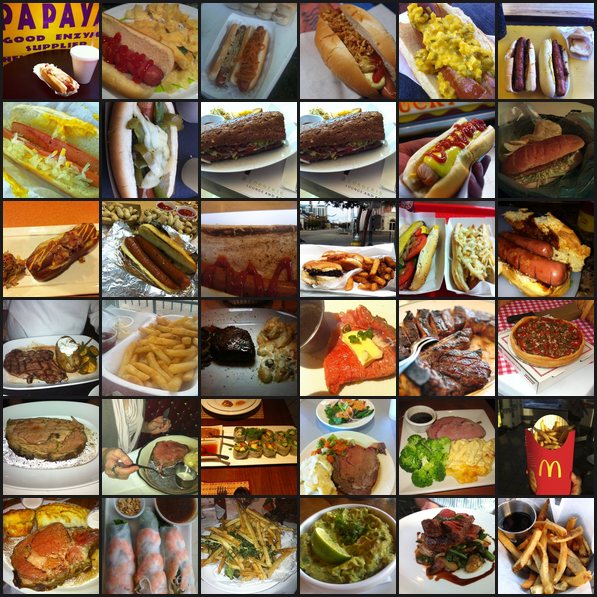
A slice of the train set. Hot dogs on top, everything else below.
In the training script, compute downloads the dataset on the machine during the run. You don’t upload images yourself.
Setup the model for training
Choose a model architecture
We'll take a randomly initialized CNN.
Choose a loss function
Cross-entropy — the usual loss for a classifier. Two classes: hot_dog and not_hot_dog.
Train the model and validate
Grab the training script. That’s the only file you need. Hand compute.cx/SKILL.md to your agent, plus the special instructions below.
curl -fsSL https://raw.githubusercontent.com/theoriclabs/letsusecompute/main/posts/not-hotdog/train.py -o train.pyWant to read it first? train.py.
Not-hotdog training prompt
Use https://compute.cx/SKILL.md.

Special instructions:
- Download https://raw.githubusercontent.com/theoriclabs/letsusecompute/main/posts/not-hotdog/train.py as train.py. Do not invent a script.
- Entrypoint: train.py::train
- Dataset: theoriclabs/hot-dog-not-hot-dog (the script downloads it on the machine)
- Randomly initialized CNN, ~93k params, CrossEntropyLoss, 50 epochs, 128x128
- Use --gpu cheap. Do not pick H100 or MI300X.
- Dry-run first. Then show the preflight quote and ask before confirming spend.
- After success, show the printed loss/accuracy and download artifacts with compute artifacts list / get.
Dry-run first. It only prints the upload plan — no dollars yet.
compute run train.py::train --gpu cheap --dry-rundry-run (local AST; no upload, no quote)
entrypoint: train.py::train
files:
train.py
third-party: datasets, huggingface_hub, torch, torchvision
gpu: cheap
timeout: 1800s
image: cuda_pytorch
pip: torchvision, datasets, huggingface_hub, Pillow
secrets: (none)Then run for real. Pass --gpu cheap and let the router pick. For this tiny CNN, cheap usually lands on a Vast.ai RTX 3090 around $0.15/hr. auto can pick a faster card if it thinks you’ll finish sooner.
compute run train.py::train --gpu cheap --timeout 1800 --waitYou’ll see the pick and the dollar quote before spend. Confirm if it looks right, or pass --yes.
Run preflight (billed by started minute):
  provider:       vastai
  sku:            RTX-3090
  policy:         cheap
  locked rate:    $0.15/hr
  timeout budget: 31 billed min → ≈ $0.08 total if the job runs to the timeout
  balance:        $9.16
Validate the results
With --wait, the run prints the numbers when it finishes — train loss and test accuracy. Pull the weights after that:
compute artifacts list <run_id>
compute artifacts get <run_id> <artifact_id> <version> --out ./weights
Or skip training and take this guide’s checkpoint: theoriclabs/not-hotdog-cnn.
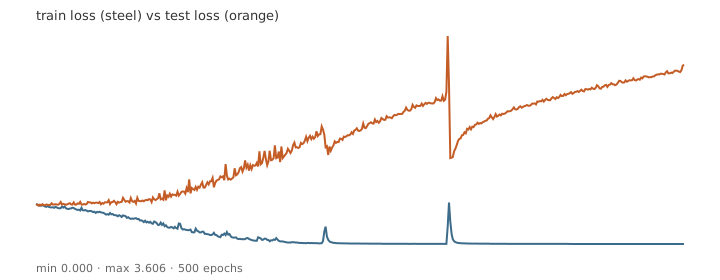
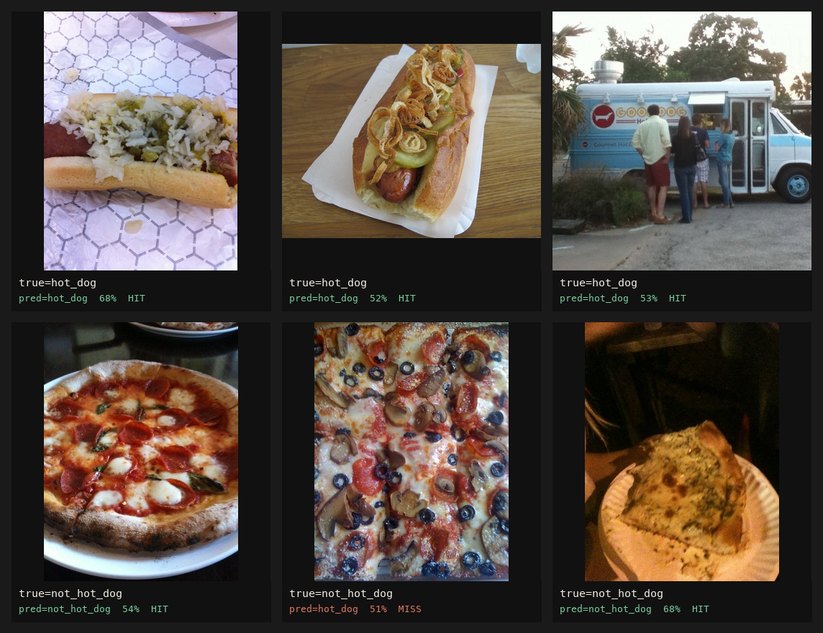
After 50 epochs: train loss 0.566, test accuracy 58.8%. After 500 epochs on an A100 (run_35edd3c1cde2359be45c8ceaffcd017e): train loss ~0.0006, test accuracy 66.0% (best mid-run ~66.8% at epoch 225) — classic overfit; train collapses while test loss climbs.